


Klipzo – AI Video Creator
4.04.00 Reviews
App Specs
- Version
- 2.0
- Updated On
- License
- Free
- Downloads
- 50,000+
- Developer
- Noventis Technologies LLC
- Categories
- Photography
- Platform
- Android
Screenshots
 Analysis by AppCompare
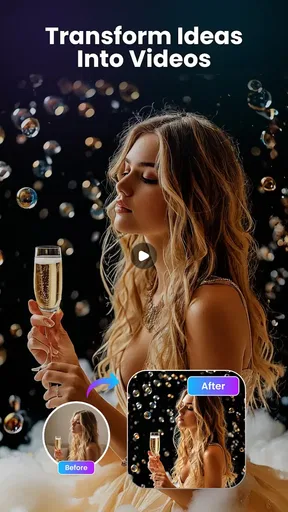
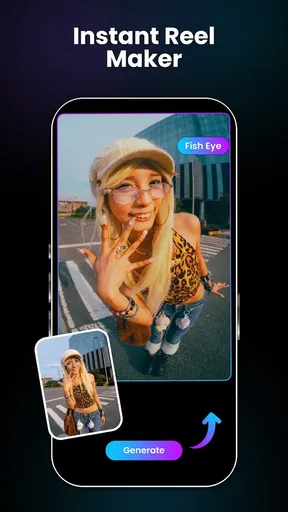
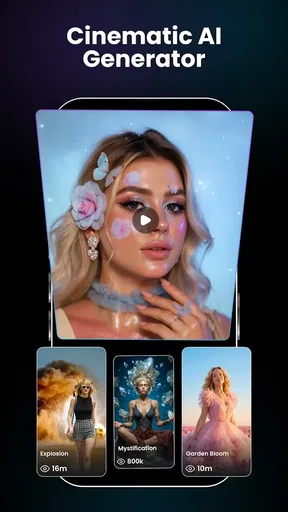
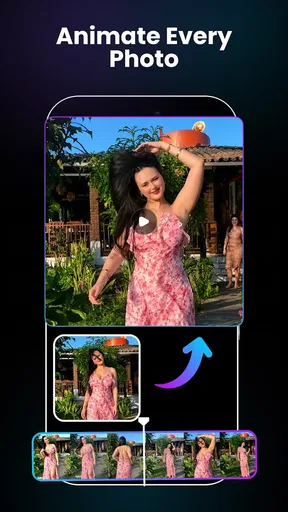
I approached Klipzo – AI Video Creator as someone who already keeps plenty of photos on a phone but rarely has the time or patience to turn them into something more engaging. The idea is simple: use still images as the starting point for AI-generated videos. That puts it in the photography category, but its real appeal sits between a photo editor and a lightweight video-making tool.
My first impression is that Klipzo is aimed at people who want movement and atmosphere without learning a traditional editing timeline. You choose a photo, let the app transform it, and judge whether the result feels lively enough to share. That is a much narrower job than full video editing, and understanding that distinction is the key to deciding whether it belongs on your phone.
The app is free to install, although it includes optional purchases ranging from $0.99 to $149.99 for individual items. It is made by Noventis Technologies LLC, carries a Mature 17+ content rating, and is currently listed as version 2.0 for devices running Android 8.1 or later. Those details matter because this is not positioned as a children’s photo toy or a complete professional suite; it is an AI-focused creative tool with a fairly broad age classification.
What I looked for before recommending it
When I review an app like this, I do not judge it only by whether it can produce an attractive clip once. I want to know how much control I have, how predictable the results are, how quickly I can get from a photo to a shareable video, and whether the process remains useful after the novelty wears off.
For Klipzo, the most important decision criteria are the quality of the source photo, the amount of creative control available, and the kind of result you actually need. A person making a quick social post has different expectations from someone preparing a polished product presentation, a family montage, or a client deliverable.
I also pay attention to the difference between “animated” and “edited.” Turning a still image into an AI video can create motion and visual interest, but it does not automatically provide the careful timing, shot selection, audio mixing, captions, transitions, and frame-by-frame control that people associate with a conventional video editor.
That difference is not a criticism by itself. In fact, it is one of Klipzo’s strengths. The app makes more sense when I treat it as a fast idea generator and photo-to-video shortcut rather than as a replacement for every other tool in my editing setup.
Worth Reading Before You Choose

EA SPORTS FC Mobile 26 Is a Bigger Football Game, but It Takes Time

Flipboard Shows What News Apps Must Do Beyond the Feed

Switching to Android Auto Means Rethinking Your Driving Routine

Google Calendar Makes a Crowded Week Easier to Manage

Ludo King Makes the Most of the Minutes Between Plans

Baby Panda World Brings Quick Play to Modern Phones, but Its Game Library Feels Busy
Start with the right photo
The most useful practical lesson is to choose the source image before thinking about effects. A photo with a clear subject, visible depth, and enough surrounding space gives an AI animation more room to look convincing. A tightly cropped image, a busy background, or several overlapping people can make the result feel less controlled.
I would prepare a small group of candidate photos instead of committing to the first image in my camera roll. A portrait with the subject separated from the background is a better starting point for a subtle motion treatment than a crowded group shot. Likewise, a landscape with a distinct foreground and background has more potential than a flat image where every object sits at the same visual distance.
This is a non-obvious trade-off: higher-resolution photography is not automatically better if the composition is difficult to interpret. Klipzo’s value depends partly on how clearly the image communicates what should remain stable and what can appear to move. Spending a minute selecting the right source can save much more time than repeatedly regenerating a weak one.
Think in short visual moments
I find the app easier to evaluate when I give each photo one job. Instead of asking it to tell an entire story, I use a single image to create a brief mood, reveal a detail, or add motion to a moment that would otherwise remain static. This approach makes the output easier to judge and reduces the temptation to expect a full production from one picture.
For example, a travel photo can work as an opening moment in a personal montage, while a close-up of a handmade object can become a visual pause in a small promotional sequence. A favorite pet photo may be enjoyable as a standalone clip, but it becomes more useful when I know whether I want a playful post, a memory, or a visual message to send privately.
The important workflow tip is to decide the destination first. If the video is going into a social feed, I want a strong subject and an immediate visual hook. If I am sending it to family, emotional timing matters more than dramatic movement. If I am building a larger edit elsewhere, I care about whether the generated clip can serve as a short insert rather than trying to make it carry the entire project.
Where the app feels most useful
Klipzo’s clearest advantage is speed. Traditional video editing asks me to gather media, arrange clips, trim timing, add motion, and often deal with audio or text. Klipzo focuses on the first creative leap: making a still image feel less static. That can be enough when I need a quick result and do not want to open a complex editor.
I can see it working particularly well for people who have attractive photos but no recorded video. A small business owner may have product images and want a more dynamic post. A traveler may have a collection of scenic pictures and want to turn one of them into a short visual update. Someone preparing a birthday message may prefer a moving photo over a plain image without spending an evening learning editing controls.
Another strong use is experimentation. Because the starting point is a photo I already understand, I can test different creative directions without filming again. That makes the app useful during the early stage of a project, when I am exploring whether an image should become an introduction, a transition, or a standalone clip.
The best reason to use Klipzo is not that it replaces editing; it is that it lowers the effort needed to create a first moving version of an idea.
A realistic everyday workflow
Imagine I return from a weekend trip with dozens of photos but only one that really captures the atmosphere of the place. I would first duplicate that image or keep the original safely stored, then choose the strongest composition for the experiment. I would create a short animated version, watch it without immediately sharing it, and check whether the movement supports the scene or distracts from it.
If the result works, I might use it as the opening of a small travel montage assembled in another editor. If it feels too artificial, I would try a different photo rather than forcing the same image through repeated attempts. That is an important efficiency habit: change the source when the visual structure is the problem, instead of assuming that more processing will fix it.
For a shop owner, the workflow would be different. I would photograph one product against a clean background, create a moving version, and inspect the edges, labels, and fine details carefully. If the product’s shape or text looks unstable, I would use the clip only as an atmospheric post and keep the precise product information in a separate still image or conventional edit.
Where the usual alternatives fit better
A standard photo editor remains the better choice when the main task is correction rather than animation. If I need to crop, retouch, adjust color, remove an unwanted object, or prepare an image for printing, an established photography tool gives me more direct control. Klipzo is not the first app I would open for those jobs.
A conventional video editor is also a stronger option when I need a sequence with exact timing. If the project depends on several clips, carefully synchronized music, captions, voice-over, or precise transitions, I would rather use a timeline-based app. Those tools take longer to learn, but they make the structure visible and editable.
Template-based social video apps may be more suitable when I want a predictable layout. They often guide the user through a fixed rhythm of images, text, and music. Klipzo is more interesting when I want the photo itself to become the source of motion, but a template editor can be faster for a polished announcement that follows a familiar format.
There is also a creative difference between AI animation and recording real footage. Real video preserves authentic movement, expressions, sound, and timing. Klipzo can help when I do not have footage, but it cannot recreate the personal value of a genuinely recorded moment. For family memories, behind-the-scenes content, or demonstrations where physical action matters, filming first is usually the better choice.
Limits I would take seriously
The biggest limitation is predictability. AI-generated motion can be appealing in one image and awkward in another. Fine details, faces, hands, text, reflections, and complicated backgrounds deserve a careful review before I share the result publicly. A clip that looks impressive at a glance may reveal distracting changes when watched more closely.
This is especially important for commercial work. If a logo, package label, piece of jewelry, or product measurement must remain exact, I would not rely on an animated result without checking every important detail. Klipzo can add visual energy around a product, but it should not be treated as proof that the product itself has been represented perfectly.
Another limitation is that a photo-to-video app can encourage repetitive content. If every image receives the same kind of treatment, a personal feed may start to feel mechanically generated. I would use the app selectively, mixing animated photos with untouched images, real footage, and ordinary edits so that motion remains meaningful rather than becoming the default.
The Mature 17+ rating is also something families should consider before handing the app to younger users. Even if a particular creative project seems harmless, the age classification means parents should make their own decision about whether it is appropriate for a child’s device and use case.
What the free entry point really means
The free price makes it easy to test the basic idea before deciding whether it fits my workflow. That is valuable because the usefulness of AI photo animation is highly personal: the same output can feel magical to one person and unnecessary to another.
However, optional purchases can change how comfortable the app feels over time. The listed range stretches from small individual purchases to much more expensive items, so I would inspect each purchase screen carefully and avoid assuming that installing the app means every creative option will remain free. I would also decide in advance how often I expect to create videos, because occasional experimentation and regular production have very different cost implications.
My advice is to test the app with photos that represent your real needs, not only the most dramatic image in your gallery. Try a portrait, a landscape, and a practical image such as a product or event photo. That gives a more honest sense of whether Klipzo helps with your everyday projects or only produces an attractive first impression.
How much work is involved in switching
Switching to Klipzo is relatively easy if your current process is simply “choose a photo and share it.” The mental adjustment is small because the app starts with media you already have. The larger change comes when you expect to replace a full editor. Then you may find yourself moving the generated clips into another app for trimming, sequencing, captions, audio, or final presentation.
That extra step is not necessarily wasted effort. I often prefer a focused tool for generating one visual element and a separate editor for assembling the finished piece. The trade-off is that every handoff adds time and creates another point where file organization matters. I would name or sort the generated clips immediately, especially if I am testing several photos from the same event.
For a casual user, that workflow may be more effort than the project deserves. For a creator who already edits videos, it can be a useful addition because it fills a specific gap: creating motion from images that would otherwise remain unused.
Who should try it first
I would recommend Klipzo to photo-heavy users who want a quick way to make still images feel more alive. It is a good candidate for casual social posts, personal greetings, visual experiments, small promotional concepts, and short inserts for a larger video. It is also worth trying if you are curious about AI creativity but do not want to begin with a complicated production suite.
People who should approach it more cautiously include professional editors who need repeatable, exact results; families looking for a child-focused creative app; and anyone whose main requirement is photo correction rather than motion. I would also skip it as a primary tool if your projects depend on recorded sound, detailed captions, multi-scene storytelling, or strict brand accuracy.
The current audience response suggests that the app has attracted meaningful interest, with an average rating of 4.0 from around 8.9 thousand ratings and more than 50 thousand installs. I read that as a reason to take it seriously, not as a guarantee that every output will suit every photo. The experience still depends heavily on the image I provide and on how much control I expect afterward.
My recommendation after weighing the trade-offs
After using it as a decision rather than a novelty, I see Klipzo as a focused photography companion. It is most convincing when I have a strong still image and want to create a quick moving interpretation without building a timeline from scratch. Its value drops when precision, consistency, or complete editing control becomes more important than speed.
I would install the free version if my goal were to explore photo-to-video ideas, create occasional personal content, or add a distinctive visual moment to a project. I would not purchase anything immediately. I would first test several different source images, examine faces and fine details at normal viewing size, and decide whether the results are useful often enough to justify optional spending.
Version 2.0 gives the app a clear identity, but the right way to judge it is still practical: does it save me time on the specific images I want to animate? If the answer is yes, it can earn a place beside a normal photo editor and a conventional video editor. If I need exact storytelling control, I would choose those alternatives instead.
My final recommendation is therefore positive but selective. Klipzo – AI Video Creator is worth trying for fast, photo-led creativity, especially when I want a still image to become a short visual moment. I would treat it as a specialized shortcut, review every generated clip before sharing, and keep expectations realistic. Used that way, it offers a convenient bridge between photography and video without pretending to be the entire bridge.
Pros
- Creates polished short videos from simple text prompts.
- AI-assisted editing helps beginners produce content quickly.
- Useful templates for social media formats and campaigns.
- Can inspire ideas when starting with a blank project.
- Reduces the need for advanced video-editing skills.
Cons
- AI results may require several attempts to match your vision.
- Some advanced tools may be limited to paid plans.
- Generated visuals can occasionally look generic or inconsistent.
- Export quality and options may vary by subscription tier.
- Processing times can increase for longer or complex videos.
FAQs for Klipzo – AI Video Creator
What is Klipzo – AI Video Creator, and what can I use it for?
Klipzo – AI Video Creator is designed to help users produce short videos with the assistance of artificial intelligence. It can be useful for creating social media clips, promotional content, visual stories, and entertaining videos without requiring advanced editing skills. Depending on the version available on your device, features may include AI-assisted generation, templates, effects, text, music, transitions, and automated editing tools.
Does Klipzo create complete videos automatically from a text prompt?
Klipzo may simplify video production through AI-powered tools, but users should not assume that every result is created perfectly with a single prompt. The available workflow can depend on the app version, selected template, media input, and subscription plan. In many cases, you may still need to review the generated scenes, adjust text, replace images or clips, and make final edits before publishing.
Is Klipzo – AI Video Creator free to download and use?
The app may be available to download at no initial cost, but some advanced tools, premium templates, export options, effects, or AI features can require in-app purchases or a subscription. Before starting a trial, carefully check the pricing, renewal conditions, and cancellation policy shown in the relevant Google Play Store or Apple App Store listing. Free access may also include limitations such as watermarks or restricted exports.
Can I use Klipzo videos for commercial or social media purposes?
Klipzo can be useful for content intended for platforms such as TikTok, Instagram, YouTube, and other social networks, but commercial usage depends on the app’s license terms and the rights attached to its templates, music, stock media, fonts, and AI-generated content. Review the current terms before using a video in advertising, client work, or monetized publishing, and make sure any uploaded material belongs to you or is properly licensed.
What should I know about privacy when using Klipzo?
Creating AI videos may require access to photos, videos, audio files, camera features, or text entered into the app. Some processing could occur online, so users should review Klipzo’s privacy policy and permission requests before uploading personal, confidential, or sensitive material. Avoid submitting private information unnecessarily, and check how long uploaded content is stored, whether it is used to improve services, and how account data can be deleted.


